composite-js
◁ Reactivity Rendering ≡ Table of Contents Routing ▷
Composite Binding
Composite binding is the mechanism used by composite-js to connect the view of a composite with its application module. The composer, as the central runtime component for realizing composites, establishes this technical connection.
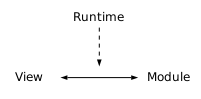
The runtime provides the infrastructure for connecting views and application modules but does not define the internal structure or architectural role of an application module. Depending on the application architecture, an application module can implement a ViewModel, Controller, Service, application model or another application-specific structure — see Architectural Patterns.
Contents Overview
Terms
The terms used here are defined in the chapter Architecture. The following sections describe them from the perspective of composite binding.
Application Module
Provides the application logic of a composite (see Application Module). From a binding perspective, the key rule is: objects that participate in composite binding must be explicitly exported from the composite script.
Application modules are distinct from domain models. UI-specific state such as selection, visibility or presentation status belongs to the application module or its presentation logic, while domain models represent domain-specific data and rules.
View
The HTML representation of a composite (see View). It defines structure and presentation and can use expressions and declarative attributes to access application data, handle interactions and control rendering behavior, but does not define application-specific logic itself.
Runtime
Provides the infrastructure that connects views and application modules, including resource loading, composite realization, binding, rendering and lifecycle management — see Runtime for the full list and its responsibilities. The runtime does not implement application-specific behavior or define the internal structure of an application module.
Composer
The runtime component that realizes composites and establishes composite binding between view and application module — see Composer.
Composite
An independently identified, domain-oriented application unit within the DOM, consisting of HTML (view), CSS, JavaScript (composite script) and optional additional resources — see Composite for structure and resource layout. Each composite is identified by a composite ID that connects it with its view, application module and associated resources.
Binding
Composite binding connects the HTML view of a composite with its application module.
The composer establishes the binding for the composite. The runtime provides mechanisms for:
- synchronizing values between view elements and application module properties,
- forwarding UI events,
- invoking application module methods,
- evaluating expressions, and
- integrating the application module into the composite lifecycle.
HTML elements inside the composite participate in the binding through their attributes and identifiers. The binding behavior of an element is defined by the corresponding declarative markup. The object exported by the composite script is the application module used by the binding.
const example = {
    message: "Hello",
    submit() {
        ...
    }
};

#export example;
<form id="example" composite>
  <input id="message" type="text" events="change"/>
  <button id="submit" type="submit">Submit</button>
</form>
Synchronization
Synchronization transfers values between view elements and the corresponding properties of the application module.
Synchronization is triggered by the events declared with the events attribute
and can be combined with validation.
More details about the usage can be found in chapter events.
Validation
Validation determines whether a value may be synchronized between the view and the application module.
Validation is declared with the validate attribute together with the
corresponding event configuration. The validation logic is provided by the
application module.
const example = {
    message: "",
    validate(element, value) {
        return true;
    }
};

#export example;
<input id="message" type="text"
    events="input change" validate/>
More details about the usage can be found in chapter validate.
Events
The composer forwards supported HTML events to the corresponding methods of the application module. Event handlers are resolved from the application module based on the element IDs inside the composite.
const contact = {
    mail: {
        onClick(event) {
            const mail =
                "mailto:mail@local?subject=Test&body=Greetings";
            document.location.href = mail;
            return false;
        }
    }
};

#export contact;
<div id="contact" composite>
  <p>
    Example for use of events.
  </p>
  <button id="mail">
    Click Me!
  </button>
</div>
The composer establishes the event connection as part of composite binding. The application module remains responsible for the application-specific behavior executed by the event handler.
Dock
When a composite becomes part of the document, the composer integrates its
application module into the composite lifecycle. If the application module
provides a dock() callback, it can react to the composite being attached.
const example = {
    dock() {
        ...
    }
};

#export example;
The callback can be used to initialize or prepare application-specific state when the composite is attached. It does not control the composite lifecycle or the rendering process.
Undock
When a composite is removed from the document, the composer removes its runtime
connections. If the application module provides an undock() callback, it can
react to the composite being detached and perform application-specific cleanup.
const example = {
    undock() {
        ...
    }
};

#export example;
If a composite is controlled by a condition, docking and undocking depend on the evaluation of that condition.
Architectural Patterns
The architectural role of an application module depends entirely on its implementation, not on the runtime. The following patterns show how established architectures can be mapped onto an application module.
MVC
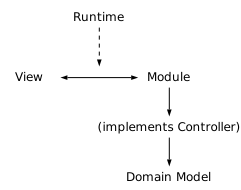
The application module can implement the Controller, processing user interactions, coordinating domain models and invoking services.
MVVM
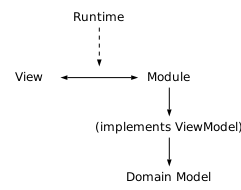
The application module can implement the ViewModel, containing presentation logic, UI-specific state, computed values and commands. Domain data remains part of the domain model.
MVCS
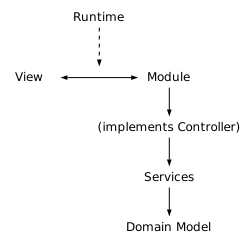
The application module can implement the Controller, delegating application-specific responsibilities to Services.
Other Architectures
An application module can just as well implement a Service, an application model, or another application-specific structure. In every case, composite binding connects view and application module the same way.