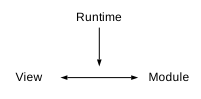
 Depending on the application architecture, a module may implement a ViewModel,
Controller, Service, Application Model, or another architectural role defined by
the application.
## Contents Overview
- [Application Module](#application-module)
- [View](#view)
- [Application Runtime](#application-runtime)
- [Composite](#composite)
- [Binding](#binding)
- [Synchronization](#synchronization)
- [Validation](#validation)
- [Events](#events)
- [Dock](#dock)
- [Undock](#undock)
- [Architectural Patterns](#architectural-patterns)
- [MVC](#mvc)
- [MVVM](#mvvm)
- [MVCS](#mvcs)
- [Other Architectures](#other-architectures)
## Application Module
An Application Module (module) is the JavaScript object associated with a
Composite.
Together with HTML, CSS, and optional additional resources, it forms a Composite
within an application. Modules provide application-specific functionality for
Views, which may include data, state, interactions, presentation logic, or
coordination with other parts of the application.
The runtime connects the View with its corresponding module but does not impose
an architectural pattern. A module can implement one of many architectural
roles, for example:
- ViewModel
- Controller
- Service
- Application Model
- another architectural role defined by the application
Modules can contain presentation logic, coordinate Domain Models, invoke
services or manage UI-specific state.
## View
The View defines the user interface and is implemented with HTML markup. It
represents the information and interactions provided by the associated module
according to its own structure. The View is responsible for presentation and
does not define application logic. The runtime connects and synchronizes the
View with the associated module.
## Application Runtime
The Application Runtime (runtime) provides the infrastructure required to
connect Views and modules.
Its responsibilities include:
- connecting Views with modules,
- synchronizing values between Views and modules,
- forwarding UI events,
- rendering and reactive updates,
- routing,
- Composite management, and
- lifecycle management.
The runtime manages the binding mechanisms between the View and the module. It
provides infrastructure for rendering, synchronization, events, routing and
lifecycle management, but does not implement application logic or define the
architectural role of a module.
## Composite
A Composite is the basis for View-Module Binding and consists of:
- HTML
- CSS
- JavaScript (Application Module)
- optional additional resources
Each Composite is identified by its Composite ID, which connects the HTML
element, the corresponding module, and the CSS selector.
```html
```
```javascript
const example = {
...
}
```
```css
#example {
...
}
```
The Composite ID uniquely identifies a Composite within the application. It is
formed from the `id` and `composite` attributes of the HTML element and
determines the location of the corresponding module in the runtime namespace
hierarchy. A Composite ID consists of letters, digits, and underscores and must
start with a letter or an underscore.
Elements inside the Composite that define an `id` can be mapped to corresponding
properties or methods of the module according to the binding
configuration.
```javascript
const model = {
message: "Hello",
submit: {
...
}
};
```
```html
```
## Binding
View-Module Binding connects the HTML View of a Composite with its associated
module. The runtime performs event wiring and synchronization based
on the binding configuration.
The runtime:
- synchronizes values,
- forwards UI events,
- invokes module methods, and
- updates the View.
```javascript
const model = {
message: "Hello",
dock() {
...
},
undock() {
...
},
submit: {
onClick(event) {
...
}
}
};
```
```html
```
## Synchronization
Synchronization transfers values between HTML elements and the corresponding
properties of the module in addition to the static binding. It is triggered only
by the events declared with the `events` attribute.
More details about the usage can be found in chapter [events](markup.md#events).
## Validation
Validation controls whether synchronization of values between the View and the
module is performed. It is declared with the `validate` attribute together with
the `events` attribute. The corresponding validation method is implemented by
the module.
More details about the usage can be found in chapter [validate](
markup.md#validate).
## Events
The runtime forwards supported HTML events to matching methods of the module.
Events are mapped to methods following a naming convention. Matching methods are
discovered during binding and registered automatically as event listeners. Event
handlers can be resolved from module methods according to the naming convention.
```javascript
const contact = {
mail: {
onClick(event) {
const mail = "mailto:mail@local?subject=Test&body=Greetings";
document.location.href = mail;
return false;
}
}
};
```
```html
Depending on the application architecture, a module may implement a ViewModel,
Controller, Service, Application Model, or another architectural role defined by
the application.
## Contents Overview
- [Application Module](#application-module)
- [View](#view)
- [Application Runtime](#application-runtime)
- [Composite](#composite)
- [Binding](#binding)
- [Synchronization](#synchronization)
- [Validation](#validation)
- [Events](#events)
- [Dock](#dock)
- [Undock](#undock)
- [Architectural Patterns](#architectural-patterns)
- [MVC](#mvc)
- [MVVM](#mvvm)
- [MVCS](#mvcs)
- [Other Architectures](#other-architectures)
## Application Module
An Application Module (module) is the JavaScript object associated with a
Composite.
Together with HTML, CSS, and optional additional resources, it forms a Composite
within an application. Modules provide application-specific functionality for
Views, which may include data, state, interactions, presentation logic, or
coordination with other parts of the application.
The runtime connects the View with its corresponding module but does not impose
an architectural pattern. A module can implement one of many architectural
roles, for example:
- ViewModel
- Controller
- Service
- Application Model
- another architectural role defined by the application
Modules can contain presentation logic, coordinate Domain Models, invoke
services or manage UI-specific state.
## View
The View defines the user interface and is implemented with HTML markup. It
represents the information and interactions provided by the associated module
according to its own structure. The View is responsible for presentation and
does not define application logic. The runtime connects and synchronizes the
View with the associated module.
## Application Runtime
The Application Runtime (runtime) provides the infrastructure required to
connect Views and modules.
Its responsibilities include:
- connecting Views with modules,
- synchronizing values between Views and modules,
- forwarding UI events,
- rendering and reactive updates,
- routing,
- Composite management, and
- lifecycle management.
The runtime manages the binding mechanisms between the View and the module. It
provides infrastructure for rendering, synchronization, events, routing and
lifecycle management, but does not implement application logic or define the
architectural role of a module.
## Composite
A Composite is the basis for View-Module Binding and consists of:
- HTML
- CSS
- JavaScript (Application Module)
- optional additional resources
Each Composite is identified by its Composite ID, which connects the HTML
element, the corresponding module, and the CSS selector.
```html
```
```javascript
const example = {
...
}
```
```css
#example {
...
}
```
The Composite ID uniquely identifies a Composite within the application. It is
formed from the `id` and `composite` attributes of the HTML element and
determines the location of the corresponding module in the runtime namespace
hierarchy. A Composite ID consists of letters, digits, and underscores and must
start with a letter or an underscore.
Elements inside the Composite that define an `id` can be mapped to corresponding
properties or methods of the module according to the binding
configuration.
```javascript
const model = {
message: "Hello",
submit: {
...
}
};
```
```html
```
## Binding
View-Module Binding connects the HTML View of a Composite with its associated
module. The runtime performs event wiring and synchronization based
on the binding configuration.
The runtime:
- synchronizes values,
- forwards UI events,
- invokes module methods, and
- updates the View.
```javascript
const model = {
message: "Hello",
dock() {
...
},
undock() {
...
},
submit: {
onClick(event) {
...
}
}
};
```
```html
```
## Synchronization
Synchronization transfers values between HTML elements and the corresponding
properties of the module in addition to the static binding. It is triggered only
by the events declared with the `events` attribute.
More details about the usage can be found in chapter [events](markup.md#events).
## Validation
Validation controls whether synchronization of values between the View and the
module is performed. It is declared with the `validate` attribute together with
the `events` attribute. The corresponding validation method is implemented by
the module.
More details about the usage can be found in chapter [validate](
markup.md#validate).
## Events
The runtime forwards supported HTML events to matching methods of the module.
Events are mapped to methods following a naming convention. Matching methods are
discovered during binding and registered automatically as event listeners. Event
handlers can be resolved from module methods according to the naming convention.
```javascript
const contact = {
mail: {
onClick(event) {
const mail = "mailto:mail@local?subject=Test&body=Greetings";
document.location.href = mail;
return false;
}
}
};
```
```html
Example for use of events.
The architectural role of a module depends entirely on its implementation.
### MVC
In MVC, the module typically implements the Controller.
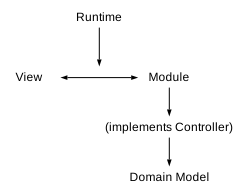 The Controller processes user interactions, coordinates Domain Models, and
invokes services.
### MVVM
In MVVM, the module typically implements the ViewModel.
The Controller processes user interactions, coordinates Domain Models, and
invokes services.
### MVVM
In MVVM, the module typically implements the ViewModel.
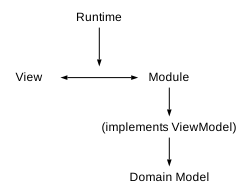 The ViewModel contains presentation logic, UI state, computed values, and commands.
Domain data remains part of the Domain Model.
### MVCS
In MVCS, the module typically implements the Controller and delegates
application logic to services.
The ViewModel contains presentation logic, UI state, computed values, and commands.
Domain data remains part of the Domain Model.
### MVCS
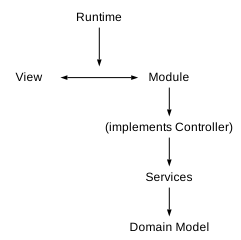
In MVCS, the module typically implements the Controller and delegates
application logic to services.
 ### Other Architectures
The runtime is independent of any specific architectural pattern.
A module may also implement:
- a Service
- an Application Model
- another architectural role defined by the application
The runtime connects Views with their associated modules.
The architectural role of that module is defined solely by the application.
- - -
◁ [Reactivity Rendering](reactive.md)
≡ [Table of Contents](README.md#model-view-controller)
[Routing](routing.md) ▷
### Other Architectures
The runtime is independent of any specific architectural pattern.
A module may also implement:
- a Service
- an Application Model
- another architectural role defined by the application
The runtime connects Views with their associated modules.
The architectural role of that module is defined solely by the application.
- - -
◁ [Reactivity Rendering](reactive.md)
≡ [Table of Contents](README.md#model-view-controller)
[Routing](routing.md) ▷